ClassicBoy Pro - Game Emulator
- 3.9
- Rating
- 1.00M
- Installs
- Free
- Price

 Analysis by App-foxy
I approached ClassicBoy Pro less like a modern arcade release and more like a compact doorway into older game libraries. Its appeal is not a new fictional world, a campaign, or a signature character. The experience comes from bringing compatible classic games into one Android application, then making the collection easier to browse and play. That makes the mood depend heavily on the games you choose, but the application’s own design still matters because it controls how quickly you can move from an empty library to a comfortable play session.
PortableAndroid presents it as an all-in-one retro emulator for scanning ROMs, organizing playlists, and playing classic titles. In everyday use, that combination is more meaningful than it may sound. A single game can be enjoyable for ten minutes, while a well-arranged library can become something I return to whenever I have a short break. The strongest part of the concept is this sense of continuity: instead of switching between several separate emulator apps, I can keep different retro favorites in one place and decide what to play from a shared interface.
The app is free to install and is aimed at Everyone, which makes the entry point simple. It has passed one million installs and holds an average rating of 3.9 from roughly 9.6 thousand ratings, so it has found a substantial audience without being universally loved. That feels fair to me. ClassicBoy Pro can be very convenient once it is arranged properly, but the initial setup and the legal responsibility around ROM files mean it is not as effortless as opening a normal casual game.
You May Also Like

 Blood Strike: 2.5 Anniversary
Blood Strike’s Loadouts Turn Every Drop Into a Tactical Gamble
A close look at Blood Strike’s custom loadouts: how fast access to signature weapons reshapes its battle royale rhythm, rewards preparation, and narrows the gap between fights.

 Pandora - Music & Podcasts
Pandora’s Music Is Easy to Start, but Harder to Recover
Pandora’s strength is its low-effort path from a seed to a station. Its weak spot is how much confidence it asks you to place in connection, setup, and quiet recovery.

 8 Ball Pool
 Is Built on Rivalries, Rematches, and Routine
A close look at the rivalries, rematches, shared routines, and unanswered safety questions that turn a quick pool match into a persistent mobile community.

 Samsung Music
’s Quiet Strength Is Playing What You Already Own
Its reach comes less from spectacle than from dependable access to a personal library. That simplicity is both the app’s strongest retention engine and its ceiling.

 AccuWeather: Weather Radar
AccuWeather Review: A Quick, Clear Forecast for Everyday Decisions
For everyday plans, the best forecast is the one you can understand quickly. AccuWeather makes rain timing, radar, and local conditions easy to act on, with a few trade-offs.

 Hill Climb Racing
Why Hill Climb Racing Still Turns Crashes Into One More Run
A tiny car, a bumpy hill and one more upgrade: Hill Climb Racing keeps resurfacing because its simple chaos makes every near-miss feel personal.
More From Our News Desk



How the first session feels
My first impression is shaped by preparation rather than immediate action. This is an emulator, so the application itself is not a ready-made arcade cabinet filled with games. You need to bring your own legally obtained ROM files, point the scanner toward the appropriate folders, and then decide how you want the library organized. That extra step is the central trade-off: it takes longer than installing a conventional game, but it gives you a more personal collection instead of a fixed catalog.
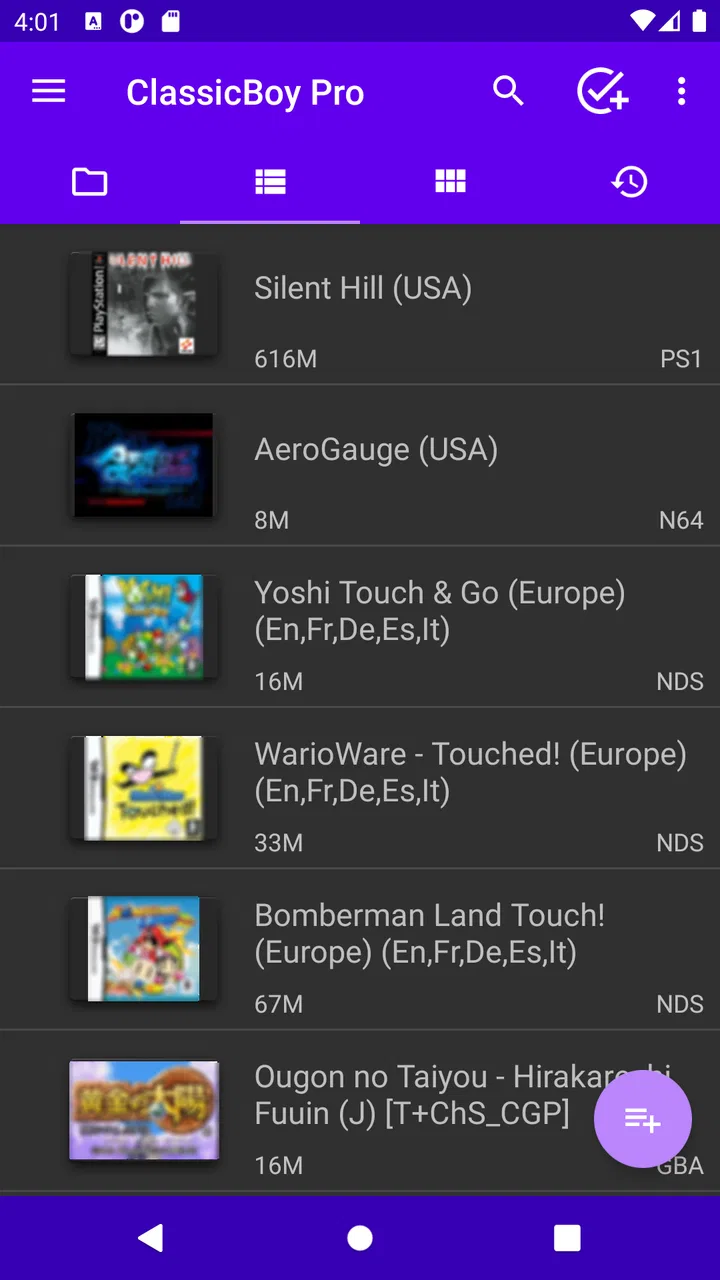
The scanning workflow is particularly useful when your files are already spread across storage. Rather than manually opening each file, I can let the application look through selected locations and turn compatible content into a browsable library. I recommend starting with one clearly named folder instead of scanning the entire device. That makes it easier to spot mistakes, avoid clutter, and understand which files the emulator has recognized before building a larger collection.
Once the library begins to fill, playlists become more than a cosmetic extra. I find them most useful when they reflect how I actually play: short arcade sessions in one group, longer role-playing adventures in another, and games suitable for a controller in a separate list. This reduces the friction of searching through a large archive. It also changes the emotional pace of the app. A random folder feels like storage; a carefully chosen playlist feels like a small personal console.
That organization is one of the less obvious strengths here. Many basic emulator alternatives concentrate almost entirely on launching a file. ClassicBoy Pro puts more emphasis on the collection around the games. If you only have one title and want to test it quickly, that broader system may feel unnecessary. If you have accumulated several classics, it becomes much easier to justify the additional setup.
A practical setup for short daily sessions
A realistic use case is a commute, a lunch break, or an evening when I want something familiar without committing to a large modern game. I would scan a small collection, create a playlist for games that work well in ten-minute sessions, and keep longer adventures separate. That simple division prevents a common problem with retro libraries: spending more time browsing than playing.
I also suggest testing one game from each intended group before importing everything. Different classic systems and individual titles can feel very different with touch controls, and a library that looks excellent on paper may not be equally comfortable on a phone. Establishing a small, reliable starting set helps reveal whether the application suits your habits before you invest time in detailed organization.
The current version is 7.3.6, and the application supports Android 5.0 and later. That broad compatibility is useful for people who keep an older Android phone for retro gaming, although the experience will still depend on the device, screen size, and controller arrangement. The version number alone does not guarantee that every title will feel perfect, so I would judge it through the games you personally want to play rather than through the library’s size.
How the visual language supports retro play
ClassicBoy Pro does not try to replace the visual identity of the games it emulates. Its role is closer to a frame around them. The original pixel art, limited color palettes, bold sprites, and compact menus provide the real art direction, while the emulator’s library and playlist tools create a modern way to reach that older material. I like this restraint because an emulator should not distract from the games it is meant to preserve for play.
The setting is therefore assembled by the player. One moment can feel like a bright arcade challenge, and the next can shift toward a slower adventure or a more technical action game. That variety is a major attraction, but it also means the application does not deliver one consistent fictional atmosphere. Its coherence comes from the ritual of selecting, launching, and returning to familiar titles rather than from a single world.
This is where playlists have an artistic effect as well as a practical one. A collection built around a particular mood can create a surprisingly focused evening. I might group colorful, fast games together when I want immediate energy, then keep exploratory or story-led classics in a separate list for a quieter session. The application gives the library enough structure for those choices to matter, even though the individual games remain stylistically distinct.
There is also a useful psychological difference between browsing a playlist and browsing raw files. File names often remind me of storage management, while a curated list invites a decision based on mood. That sounds minor, but it affects pacing. When I can select a title quickly, the emulator feels like a playable collection. When I have to inspect folders repeatedly, the retro mood is interrupted before the game begins.
The limitation is that organization cannot fix every visual mismatch. Older games were designed for different displays and control layouts, so some may look more natural on a larger screen or with a physical controller. Touch input can cover part of the image, and a small phone may make dense menus or tiny sprites less comfortable. For me, this is a reason to choose games carefully rather than a reason to dismiss the application altogether.
Why the interface matters more than decoration
With a tool like this, visual polish is not about animated backgrounds or elaborate presentation. It is about reducing the number of decisions between opening the app and playing. Clear scanning, sensible playlists, and a library that remains understandable after adding more files are more valuable than decorative effects. ClassicBoy Pro’s strongest visual contribution is the way it can turn a mixed archive into something I can read at a glance.
I would not recommend importing a huge collection on the first attempt. A smaller library makes it easier to notice duplicate files, unclear names, or games that do not belong in the same playlist. It also keeps the mood intentional. Retro gaming often works best when I choose a few titles with a reason, rather than treating the emulator as an endless warehouse.
Sound, rhythm, and the feeling of returning
The emulator’s soundscape is inherited from the games, and that is central to its charm. Chiptune melodies, sharp effects, looping stage music, and the silence between sessions all contribute to the feeling of revisiting a particular era. Because the application brings multiple classic libraries together, the sound can change dramatically from one selection to the next. That variety is exciting, but it also makes playlists valuable for controlling the evening’s rhythm.
For a quick break, I prefer games with an immediate audio and visual response. A title that starts quickly and communicates its action through clear effects feels natural on a phone. For a longer session, I am more willing to choose a game with a slower opening, a more patient soundtrack, or a larger sense of progress. The application does not impose this pacing; it lets me shape it through the collection I build.
This is one place where a conventional single-game alternative can be stronger. A dedicated retro title usually offers a unified sound and visual identity from the first screen, while ClassicBoy Pro asks me to create that coherence myself. If I want one polished, self-contained arcade experience, an ordinary game may be the better choice. If I want to move between several distinct moods without installing separate apps, this emulator has the advantage.
Audio also affects whether a game is comfortable in public. Some classic titles repeat short musical phrases aggressively, while others rely on sudden effects that are more noticeable than expected. I tend to keep the volume modest and use headphones when I want the full atmosphere. The important point is that the emulator makes access easy, but it cannot make every original sound design equally relaxing or suitable for every setting.
The rhythm of returning to a library is another quiet strength. Modern games often ask for daily tasks, long loading sequences, or a large commitment before the interesting part begins. A curated emulator playlist can offer the opposite: choose a familiar title, play for a few minutes, and stop without feeling that progress has been wasted. That makes it especially appealing to people who enjoy older arcade pacing or want a break from live-service design.
Where the controls and library structure fit
The main mechanical question is not whether the emulator can make every classic game feel identical to its original hardware. It cannot. The real question is whether its organization and access are good enough to make the compromises worthwhile. For many action and arcade games, touch controls can be acceptable for casual play, especially when the session is short. Precision-heavy games, fighting games, and titles with complicated button combinations are more likely to expose the limits of a phone screen.
A physical controller is the sensible upgrade for anyone planning longer sessions or demanding accuracy. It changes the experience from “a classic game on a phone” to something closer to a portable console. I would especially recommend one for games where timing, diagonal movement, or multiple simultaneous inputs are central. Without that, the emulator may still be useful for exploration and nostalgia, but it may not satisfy players who expect exact competitive control.
The playlist system helps with another mechanical issue: switching contexts. Instead of treating every game as an isolated launch, I can create groups based on control needs. A touch-friendly playlist might contain slower or simpler games, while controller-focused titles can stay together. This is a practical workflow that is easy to overlook, and it prevents me from repeatedly starting a game only to discover that its controls are a poor match for the current situation.
There is a learning curve around ROM management as well. You need to understand where your legally obtained files are stored and how the scanner sees them. People who are comfortable with folders will probably adapt quickly. Someone expecting a one-tap streaming service may find the process confusing. The app’s convenience begins after the library is prepared, not before.
That distinction also answers an important ownership question: this is not a source of games by itself. The emulator is the tool for managing and playing compatible ROM files, while the user remains responsible for obtaining those files legally. I consider that a reasonable boundary, but it means the application is best suited to people who already understand their own game backups and storage rather than to complete newcomers seeking an instant catalog.
ClassicBoy Pro is free, but it includes in-app purchases ranging from $1.49 to $8.99 per item. I would treat the free installation as a chance to test the workflow, not as a promise that every useful convenience will be available without additional spending. Whether the optional purchases are worthwhile depends on how often you play and how much you value the expanded experience. A casual user with one or two games may not need to spend anything, while a dedicated retro player may see more reason to consider the paid options.
Who gets the most from it
I think the best audience is someone who already owns or has legally backed up a selection of classic games and wants one organized place for them. The app is also a good fit for a player who enjoys changing genres according to mood, because playlists make that variety manageable. It works particularly well for people who prefer short, repeatable sessions and do not mind spending a little time arranging their library.
I would be more cautious about recommending it to someone who wants a modern interface with no setup, a guaranteed uniform control scheme, or a single carefully authored atmosphere. It is also not the right choice for a player who dislikes managing files. In those cases, a standalone retro-inspired game or an official collection with built-in content will feel more immediate and less technical, even if it offers less flexibility.
Another trade-off concerns nostalgia. If your enjoyment depends on the exact feel of original hardware, a phone emulator may not fully satisfy you, especially when touch controls replace physical buttons. If your priority is access and convenience, however, the ability to keep multiple classics in one organized application can outweigh that difference. I see it as a practical compromise rather than a perfect hardware replacement.
Atmosphere verdict after living with the collection
ClassicBoy Pro creates its mood through access, arrangement, and the character of the games themselves. The art direction comes from the original pixel worlds; the sound comes from their distinctive chips and effects; the pacing comes from the player’s choice between quick arcade rounds and longer adventures. The emulator succeeds when those parts are allowed to work together without too much menu friction.
PortableAndroid has built something more useful than a simple file launcher because scanning and playlists encourage a personal library. Those tools let me shape the experience around real situations: a short break, a controller session at home, or a carefully selected evening of older games. The result is not automatically elegant, though. Setup, file management, device differences, and touch-control compromises remain part of the package.
The 3.9 average rating feels consistent with that balance. There is a lot to like for the right user, but the application asks for a little knowledge and patience before its strengths become obvious. I would not install it expecting an instant arcade catalog. I would install it if I wanted a flexible home for legally obtained classic games and was willing to organize that home myself.
For me, the final recommendation is positive but specific: choose ClassicBoy Pro when variety, library management, and portable access matter more than a completely seamless console experience. Start with a small folder, build playlists around session length and control style, and test your favorite games before importing everything. The best experience comes from treating it as a curated retro shelf, not an automatic replacement for every original machine.
That approach also keeps expectations realistic. The app is free to begin with, supports Android devices from version 5.0 onward, and carries an Everyone age rating, but its value depends on the games you bring and the way you arrange them. If that personal, hands-on process sounds appealing, it can turn a scattered ROM collection into a comfortable daily arcade. If it sounds like work, a simpler standalone alternative will probably suit you better.
FAQs for ClassicBoy Pro - Game Emulator
01What is ClassicBoy Pro, and which systems can it emulate?
ClassicBoy Pro is a multi-system emulator for Android designed to run games from several classic consoles and handheld platforms in one application. Depending on the version and device, it can support systems such as PlayStation, Nintendo 64, Game Boy, Game Boy Color, Game Boy Advance, NES, SNES, Sega Genesis, Sega CD, and arcade-related formats. Compatibility can vary by game, Android version, and required BIOS files.
02Does ClassicBoy Pro include games, or do I need to provide my own ROM files?
ClassicBoy Pro does not normally include copyrighted games. You need to provide your own legally obtained ROM files and, for certain systems, compatible BIOS files. The app can scan selected folders and organize detected games, but it does not function as a game store. Users should only create or use backups of games they legally own and should check the laws applicable in their country.
03How well does ClassicBoy Pro perform on Android devices?
Performance depends heavily on the console being emulated and the hardware inside your Android phone or tablet. Older systems generally run smoothly on budget devices, while PlayStation and Nintendo 64 titles may require a stronger processor and careful graphics settings. During testing, adjusting resolution, frameskip, audio options, and rendering mode can improve performance, although some individual games may still show glitches or compatibility problems.
04Can I use controllers, save states, and other advanced features?
Yes, ClassicBoy Pro is aimed at users who want more than basic touch controls. It commonly offers customizable on-screen buttons, support for external gamepads, save states, cheats, screen layouts, and configurable controls. These features are useful for playing on a larger display or continuing a game quickly. However, controller compatibility can depend on Android, Bluetooth hardware, and the specific gamepad being used.
05Is ClassicBoy Pro free, and is it safe to download?
ClassicBoy Pro is generally offered as a paid or premium version, although availability and included features may change through Google Play updates. Downloading it from the official store is the safest option because it reduces the risk of modified installers, malware, or unwanted permissions. Before installing, review the current store listing, requested permissions, supported Android versions, and refund information, and avoid unofficial APK websites.
Pros
- Supports multiple classic console systems in one app.
- Customizable on-screen controls and external controller support.
- Save states let you pause and resume games instantly.
- Fast-forward and rewind features make difficult sections easier.
- Offers cheat-code support and flexible emulator settings.
Cons
- Game ROMs are not included and must be obtained separately.
- Some advanced features may require the paid Pro version.
- Performance can vary depending on the device and emulated system.
- Touch controls may feel cramped on smaller phone screens.
- Setup and configuration can be confusing for first-time emulator users.

ClassicBoy Pro - Game Emulator
Gallery